
A webinar works like this: you register on a web page, the platform emails you a unique join link, and at the scheduled time you click it and watch the presenters live in your browser or the app, with your camera and microphone off by default. You interact through chat, Q&A and polls, and afterward the host emails a recording plus a next step. Below is the full mechanism, from registration page to replay: who controls what, how to join on Zoom, Microsoft Teams and Google Meet, the internet speed you need, what the main platforms cost, and a 45-minute run of show you can copy.
How a webinar works, step by step
Every major platform runs the same nine-stage pipeline. The names change by vendor. The mechanics don’t.
- The host schedules the event and turns on registration. Inside the webinar software, the host sets the date, time zone, title and a registration form (name and email at minimum, plus optional custom questions). Zoom only sends its automated reminder emails when registration is required, according to Zoom’s email settings documentation.
- You fill in the registration page. That form is the lead capture. In Microsoft Teams, organizers can add custom questions, cap capacity, run a waitlist or approve registrants manually, per Microsoft’s Teams webinar guide.
- A confirmation email arrives with your personal join link. Teams sends its “attendee registration” email immediately, confirming your spot (Microsoft). Zoom’s registrant confirmation contains the join information, and if an admin turns it off, the host has to send their own or attendees cannot get in.
- Reminder emails go out. Zoom lets hosts send reminders 1 hour, 1 day or 1 week before the start. Teams sends one reminder 1 hour before by default. Livestorm recommends 3 to 4 touches: confirmation, 24 hours before, 1 hour before and “starting now” (Livestorm).
- Presenters rehearse in a backstage area. In Zoom, the host, alternative host and panelists can enter a practice session before attendees are let in. Panelists must use their own panelist link, or they land in the webinar as ordinary attendees.
- The host starts the broadcast and you click your link. If you arrive early, Zoom shows “Please wait for the host to start this webinar.” Teams can hold external attendees in a lobby until an organizer or presenter admits them.
- Presenters stream audio, video and a shared screen; attendees watch and interact. Attendees are view-only by default. They type in chat, submit questions in a separate Q&A panel (Zoom allows anonymous questions, and attendees can like each other’s questions), answer polls and raise a hand. The host can unmute an attendee or promote them to panelist.
- The platform records and logs everything. Recording, attendance, time in session, poll answers and questions all land in a report the host can export.
- Follow-up emails send the replay and the next step. Zoom has separate attendee and absentee follow-up emails, each schedulable 1 to 7 days after the start. Teams emails registrants as soon as the recording is published. The recording then becomes the on-demand version of the webinar.
Who does what: host, co-host, panelist, attendee
The role you hold decides what you can do. This is the main difference between a webinar and a regular video meeting: in a meeting everyone can talk and share; in a webinar a few people present and everyone else watches.
| Role (Zoom name / Teams name) | What they can do | Typical person |
|---|---|---|
| Host / Organizer | Schedules the webinar, starts and ends the broadcast, mutes panelists, removes attendees, downloads reports. Zoom allows only one host per webinar. | The marketing lead or whoever owns the event |
| Co-host / Co-organizer | Most host controls: manages attendees, starts and stops recording. A Zoom co-host cannot start the webinar; an alternative host can. In Teams, organizers and co-organizers can switch attendee mics and cameras on for everyone. | The producer or moderator |
| Panelist / Presenter | Turns on camera and mic, shares screen, annotates, sees the attendee list and chats. In Teams, presenters also run audience features such as polls. | Speakers and guest experts |
| Attendee | View-only by default. Can chat (if allowed), ask and upvote Q&A questions, answer polls, raise a hand. Can talk only after the host grants permission. | Everyone who registered |
Sources: Roles in Zoom Webinars and Get started with Microsoft Teams webinars. In a public Teams webinar, attendees cannot turn on their mics or cameras unless an organizer or co-organizer allows it.
Live, simulive, on-demand and webcast: how each format works
The same pipeline can run four ways. What changes is whether the video is live and whether anyone is there to answer questions in real time.
| Format | What actually plays | Live interaction | Use it when |
|---|---|---|---|
| Live webinar | Presenters stream in real time at a fixed start time | Full: chat, Q&A, polls, spoken questions | Launches, timely topics, sales webinars where the presenter’s credibility does the work |
| Simulive (automated) | A pre-recorded video plays at a scheduled time as if live. Zoom sells this in Webinars Plus as “pre-recorded content run as live” | Chat and Q&A, answered live by staff | A talk you deliver repeatedly and want word-perfect every time |
| On-demand | The recording, gated behind the same registration form, watchable any time | None live; questions go to a form or email | Evergreen lead capture after the live date |
| Webcast | A one-way broadcast to a large, mostly passive audience | Usually Q&A only | Town halls, investor updates, very large audiences. Teams supports up to 10,000 view-only attendees with Q&A |
Most B2B programs combine the first and third: run it live once, then let the recording collect registrations for months. On-demand matters more than most hosts expect. Goldcast’s 2026 B2B Webinar Benchmark Report found on-demand availability on 89.1% of webinars, with on-demand viewers making up 15.9% of total viewership.
How to join a webinar on Zoom, Teams and Google Meet
You almost never need an account or a download. Here is the exact sequence on each platform, taken from each vendor’s help center.
How to join a Zoom webinar
- Open the confirmation email (or the registration confirmation page) and click the join link. You can also open the Zoom app, click Join and paste the webinar ID, which appears after “zoom.us/w/” in the link.
- Choose the desktop app, mobile app or the Zoom Web App in your browser. Zoom supports Chrome, Firefox, Edge and Safari within the current and past 2 versions (Zoom system requirements).
- If you are not signed in, enter your name and email. Zoom states that attendees don’t need a Zoom account (Zoom pricing FAQ), unless the host has turned on authentication.
- Wait for the broadcast. Once in, you’ll see the Chat, Q&A, Raise Hand and captions controls. Your mic stays off until the host allows you to talk (Joining and participating in Zoom Webinars).
How to join a Microsoft Teams webinar
- Click the join link in the email you received after registering. Microsoft’s guide says registrants receive an email with the webinar details and their link to join.
- When prompted, choose Continue on this browser. Microsoft says you can join Teams for web on Edge or Chrome without installing anything (Join a meeting without an account).
- Select Join now. If the event requires verification, enter your email and the one-time passcode Microsoft sends you.
- If you land in the lobby, wait to be admitted. If no one admits you within 30 minutes, you are removed and can rejoin. If you registered after the start, allow up to five minutes for the registration to process, then retry.
How to join a webinar on Google Meet
- Click the Meet link in the calendar invite or email, or go to meet.google.com and enter the meeting code (Google Meet help).
- Use a current version of Chrome, Firefox, Edge or Safari (Meet requirements).
- If you aren’t signed in to a Google Account, type your name and click Ask to join. The organizer or a participant has to admit you. If you weren’t on the calendar invite, you’ll also need to be admitted.
Google Meet is a meeting tool used for webinars, not a webinar platform. Its premium features page lists Q&A, polls, recording, attendance tracking and live streaming, but no registration page, so hosts usually collect signups in a separate form and send the Meet link by calendar invite.
Internet speed you need to attend or present
Watching a webinar takes far less bandwidth than presenting in one, because attendees only download. These are the vendors’ own figures.
| Platform | Watching as an attendee | Presenting with video |
|---|---|---|
| Zoom | Screen share only: 50 to 75 kbps down. Panelist video at 720p: about 1.2 to 1.8 Mbps down. 1080p: about 2 to 3 Mbps down | Group 720p video: 2.6 Mbps up / 1.8 Mbps down. 1080p: 3.8 Mbps up / 3.0 Mbps down |
| Microsoft Teams | Large events without an eCDN: about 2 Mbps per viewer, 3 Mbps for 1080p | Meeting video: 150/200 kbps minimum, 2,500/4,000 kbps recommended (up/down) |
| Google Meet | Live stream viewers: 2.6 Mbps per feed is ideal | 720p: up to 1.7 Mbps each way. 1080p: up to 3.6 Mbps each way |
My rule of thumb for presenters: run a speed test, double the vendor’s 1080p upload figure for headroom, and plug in an ethernet cable. Microsoft explicitly recommends routing Teams traffic around a VPN, because VPNs are not built for real-time media.
Webinar platforms compared: prices and attendee caps
Prices below are what each vendor’s own US pricing page showed in late October 2026, in US dollars. Several vendors price by attendee capacity, so the number you pay rises with the room size you choose.
| Platform | Entry price (USD) | Attendee cap | Worth knowing |
|---|---|---|---|
| Zoom Webinars | $89.00/month billed monthly, or $66.67/month billed annually | Priced by capacity tier, up to 100,000 | Webinars Plus ($99.00 monthly, $82.50 annually) adds simulive and a private backstage |
| Microsoft Teams webinars | Included with Microsoft 365 Business Basic ($7.00/user/month, paid yearly) | 1,000 with registration; 10,000 view-only | Polls, custom emails and waitlists need an Enterprise-tier license (Microsoft licensing) |
| GoTo Webinar | Reach: $62/month, billed annually | 500 (mid tier $103: 1,000; Complete, quote only: 3,000) | Reach includes automated reminders, polls and Q&A |
| Livestorm | Not published in USD. Pricing page lists €2.50 per attendee credit | 3,000 live per event | Pay per unique attendee per session over 12 months; replay viewers count too |
| Demio | Starter: $45/month paid yearly, or $63 paid monthly | 50 (Growth from $117/month yearly: rooms of 150 to 3,000) | Starter sessions cap at 3 hours |
| ON24 | Quote only | Not published | Enterprise platform with analytics and content hubs |
| WebinarJam | Starter: $49/month monthly, or $39/month billed annually | 100 (Basic $99: 500; Professional $299: 2,000; Enterprise $499: 5,000) | $1 14-day trial for 500 attendees |
| Riverside | Webinar plan: $99/month, or $79/month billed annually | 100 registrants (Business, quote: up to 10,000) | Webinar plan adds registration, Q&A, polls, branded reminders and HubSpot sync |
| Google Meet | Workspace Business Standard: $14/user/month on the monthly plan | 150 participants | Q&A, polls and recording, but no registration page |
If your audience is internal or already lives in Microsoft 365, Teams is effectively free. If the webinar is a lead-generation engine, the dedicated tools win on registration pages, reminder sequences and CRM sync. Regulated firms have extra requirements around who can be invited and how replays are gated; the mechanics for fund managers are covered in how asset managers run investor webinars.
When webinars run, how long they last, and how many people show up
Roughly half of registrants watch live. The exact figure depends on whose platform data you read and whether replay viewers count.
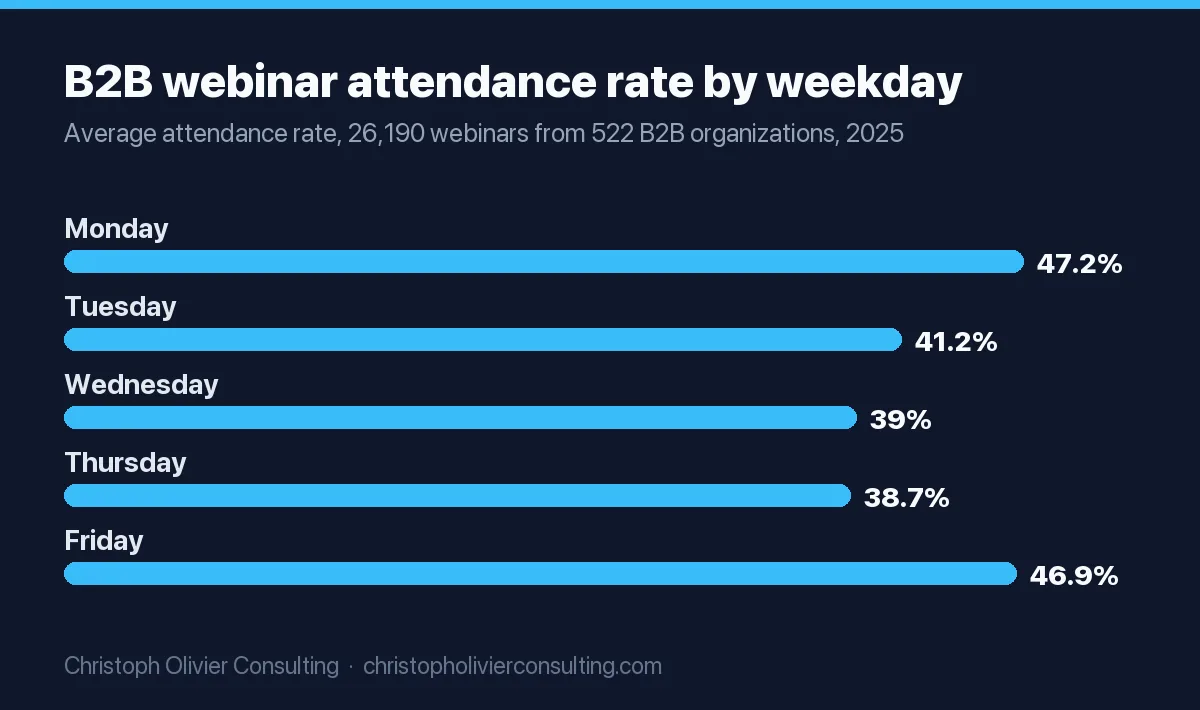
- Live attendance: 40% on average across 26,190 B2B webinars in 2025 (Goldcast). 47.7% across 33,786 sessions (Livestorm). 49% live and 57% including replay (Univid). ON24’s 2026 benchmarks put registrant-to-attendee conversion at 60% when on-demand viewers are included, as our webinar statistics breakdown details.
- Best day: it depends on the dataset. Goldcast saw Monday (47.2%) and Friday (46.9%) lead. Livestorm saw Tuesday lead at 51.7%. Univid saw Wednesday (51%) and Thursday (50%).
- Best time: noon ET is the most common start, at about 16% of webinars (Goldcast). Univid’s best slot was 3 PM local time (58.3% live attendance), then 11 AM (56.9%). Livestorm suggests Monday to Wednesday at 11 a.m. or 2 p.m. ET.
- Length: the average B2B webinar runs 56.8 minutes and the median is 60 (Goldcast). Live attendees finish about 74% of it. Univid found 60-minute webinars had the highest total attendance (62%), with 45-minute sessions close behind on call-to-action clicks (25% vs 26%).
- Registration timing: 49.7% of registrations arrive in the final 7 days and 15% on the day itself (Livestorm). That is why the 1-day and 1-hour reminders matter more than the early ones.
Those are averages, not targets. The variables you control (topic, list quality, reminder sequence) are covered in webinar marketing strategies that drive leads and sales.
A 45-minute B2B webinar run of show (copy and adapt)
This is the format I recommend for professional-service firms: 45 minutes, one presenter, one producer. It keeps teaching in the middle, takes the offer out of the closing minutes, and leaves real time for Q&A. Timings are from the moment the broadcast starts.
| Clock | Segment | Who | On screen / platform action | Say this |
|---|---|---|---|---|
| T-45 to T-5 min | Backstage check | Host, producer, speakers | Zoom practice session or Teams presenters joined early. Test screen share, slide deck, poll launch, recording on | (Producer) “Mics, cameras, slides, polls loaded. Recording starts with the broadcast.” |
| 0:00 to 2:00 | Holding slide | Producer | Title slide, chat open to everyone | “We’ll start at two past. Drop your role and firm size in the chat.” |
| 2:00 to 5:00 | Housekeeping and Poll 1 | Host | Launch Poll 1: “What’s your biggest problem with X?” (3 to 4 options) | “Questions go in the Q&A tab, not chat, so I don’t miss them. You’ll get the recording tomorrow. We finish at 45.” |
| 5:00 to 8:00 | Promise and agenda | Host | One slide: three things they’ll leave with | “By minute 30 you’ll have the three checks and the order to fix them in.” |
| 8:00 to 28:00 | Teaching block: 3 points, about 6 minutes each | Presenter | Poll 2 at about 15:00 tied to point two; producer answers simple Q&A in writing | “Point two is where most firms lose money. Quick poll: do you do this today?” |
| 28:00 to 31:00 | Worked example | Presenter | Real numbers, one example, before and after | “Here’s what this looked like with real numbers.” |
| 31:00 to 36:00 | Next step / offer | Host | Producer pins the link in chat; one link only | “If you’d rather have help, here’s how it works, what’s included and what it costs.” |
| 36:00 to 44:00 | Live Q&A | Host, producer reads | Producer reads the most liked questions aloud | (Producer) “Top question, from someone who asked anonymously…” |
| 44:00 to 45:00 | Close | Host | Repeat the link; end the broadcast for all | “Recording and slides land in your inbox tomorrow. The link is in chat one last time.” |
Two platform notes. In Teams, polls are listed as an advanced event feature, so on a Business-tier license you may run the session without them. In Zoom, co-hosts cannot start a webinar, so name an alternative host if the presenter could be late. For the offer segment, structure and slide wording are in how to structure a webinar offer that converts.
Pre-event checklist: pass or fail
- Registration required: pass if on. Without it, Zoom sends no reminders.
- Reminders scheduled: pass if confirmation, 1-day, 1-hour and a “we’re live” email are all set.
- Panelist links: pass if every speaker has their unique panelist link, not the attendee link.
- Presenter upload speed: pass if above 7.6 Mbps (double Zoom’s 3.8 Mbps 1080p upload figure), wired.
- Backup: pass if a second person has host rights and a copy of the slides.
- Follow-up: pass if separate attendee and absentee emails are written before the event, not after.
What happens after the webinar ends
The platform closes the room, finishes processing the recording, and produces a report: who registered, who attended, how long each person stayed, poll answers and every question. That report drives the follow-up.
- Same day or next morning: send attendees the replay, slides and the one next step. Zoom’s attendee follow-up can be scheduled 1 to 7 days after the start; set it to 1.
- Absentees get a different email: “Sorry we missed you, here’s the replay.” This matters because a large share of registrants never show live.
- Sort by behavior: people who stayed to the end, answered polls or asked questions go to sales or a personal follow-up first. Passive viewers go into a nurture sequence.
- Turn the recording into the on-demand version: put it behind the same registration form so it keeps collecting leads.
If you want a second opinion on turning a webinar into a dependable pipeline source, you can book a consultation.
Frequently asked questions
How do webinars work for attendees?
You register on the host's web page, then receive a confirmation email with your own join link. At the start time you click the link and watch in your browser or the app. Your camera and microphone stay off unless the host allows them. You take part through chat, a Q&A panel, polls and a raise-hand button, and afterward you usually get an email with the recording.
Do you need an account to join a webinar?
Usually not. Zoom says attendees don't need a Zoom account; you just enter your name and email. Microsoft Teams lets you continue in Edge or Chrome without signing in, though some events ask for a one-time email passcode. Google Meet lets people without a Google Account ask to join, and the organizer admits them. A host can still require sign-in for a specific event.
Can other people see me in a webinar?
Not by default. Webinar attendees are view-only: on Zoom your audio is off until the host gives you permission to talk, and in a public Teams webinar attendees cannot turn on a mic or camera unless an organizer allows it. Presenters can usually see the attendee list, and your name may show on chat messages, but Zoom lets you send Q&A questions anonymously.
Is a webinar live or recorded?
Either. A live webinar streams in real time with live Q&A. A simulive webinar plays a recording at a scheduled time while staff answer chat live; Zoom sells this in Webinars Plus. An on-demand webinar is the recording, watchable any time after you register. Most business webinars run live once and then offer the recording on demand.
How long does a webinar last?
Most run about an hour. Goldcast's 2026 benchmark of 26,190 B2B webinars found an average length of 56.8 minutes and a median of 60, with live attendees watching about 74% of the session. Univid found 60-minute webinars had the highest total attendance, while 45-minute sessions converted almost as well on calls to action, 25% against 26%.
What internet speed do you need to watch a webinar?
Less than you might think. Zoom lists 50 to 75 kbps for screen share only and about 1.2 to 1.8 Mbps to watch panelist video at 720p. Microsoft plans about 2 Mbps per viewer for large Teams events, or 3 Mbps for 1080p. Google suggests 2.6 Mbps per Meet live stream feed. Presenters need far more upload speed than attendees.
What is the webinar process from start to finish?
Nine stages: the host schedules the event and turns on registration, you register, a confirmation email delivers your join link, reminders go out, presenters rehearse backstage, the host starts the broadcast, presenters stream while attendees chat, ask questions and answer polls, the platform records and logs attendance, and follow-up emails send the replay and a next step.